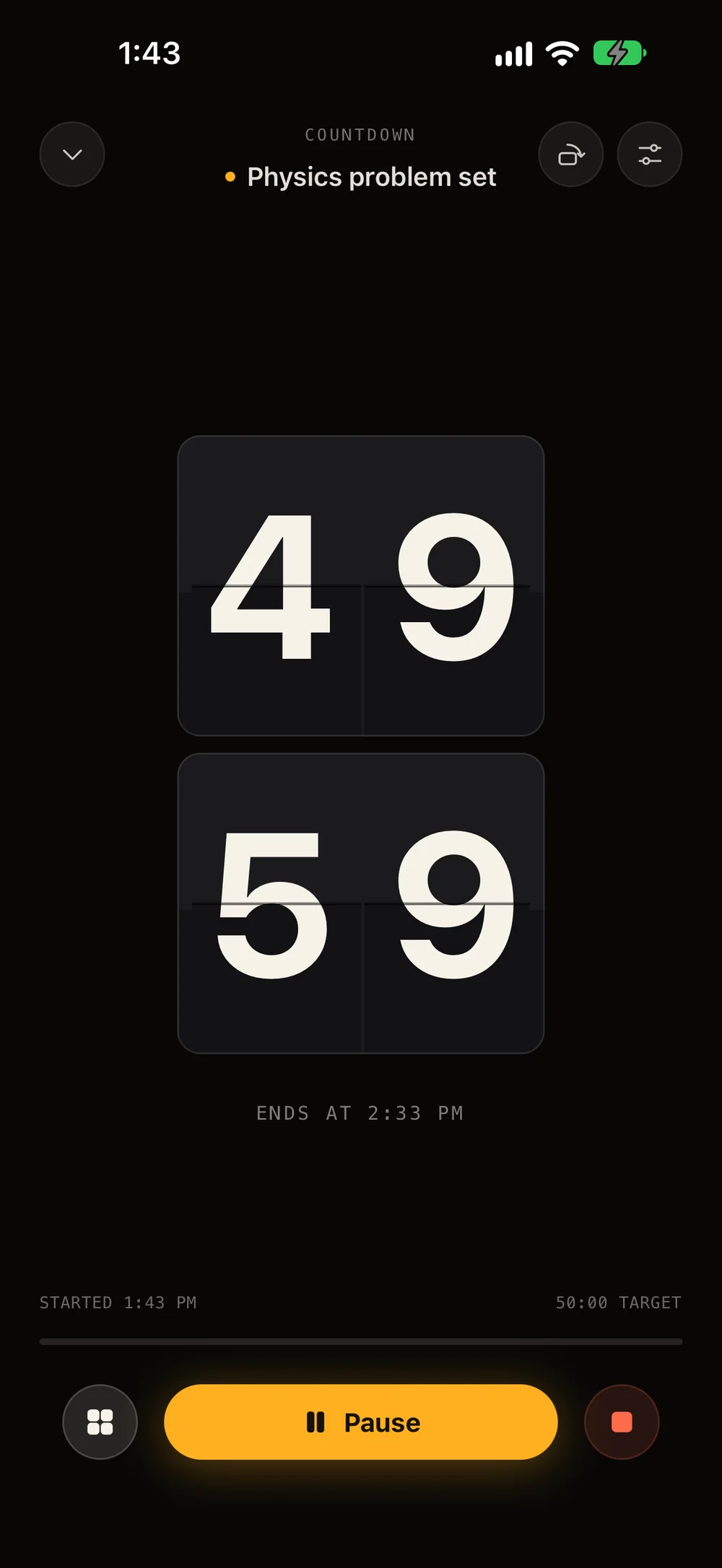
Ends at —02 · FocusA live countdown: 49 minutes 59 seconds left.
Studying
Deep work
Creative projects
Reading
Fitness
Mindfulness
Building habits
Studying
Deep work
Creative projects
Reading
Fitness
Mindfulness
Building habits
How FlipTick works
Plan. Focus. Track. Review.
Most apps make you choose between a planner and a timer. In FlipTick they’re the same thing — the block you plan is the clock you run.
01 · Plan
Plan your day in time blocks.
Give each task a time, a length, a colour and an icon. Switch on Focus session and the block gets its own Start button.
Time & length
Subtasks & notes
Alerts
Repeats
02 · Focus
Tap Start. The block becomes the clock.
A full-screen flip countdown, titled with your task and sized to your block. After a few seconds the controls fade away and only the time is left.
Countdown
Timer
Pomodoro
Landscape
03 · Track
Finish the block. It ticks itself off.
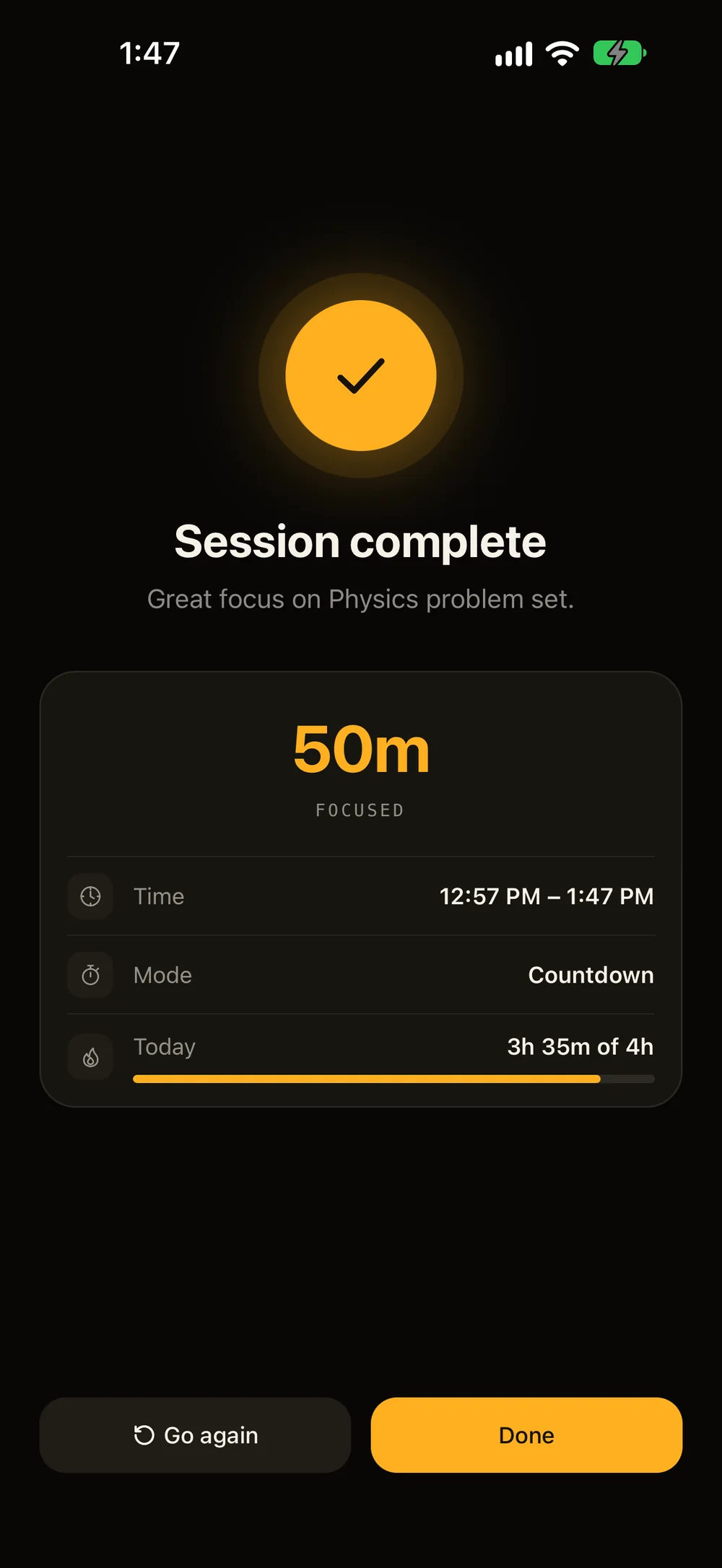
The moment a session ends it’s saved — even if you stop early — and the block is checked off on your timeline. No double bookkeeping.
Auto-tick
Session summary
Daily goal
04 · Review
See where your hours went.
Day, week, month and year, split by activity — with your peak focus hours, your longest sessions and how often you finish what you start.
By activity
Peak hours
Completion
1:30 – 2:20 PMStart session
CountdownPhysics problem set
Physics problem set
↑ 2h 9mvs previous week
01 · Plan
Everything a block needs. Nothing it doesn’t.
Build a block in seconds — a time, a length, an activity — then add only what helps: subtasks, notes, alerts or a repeat.
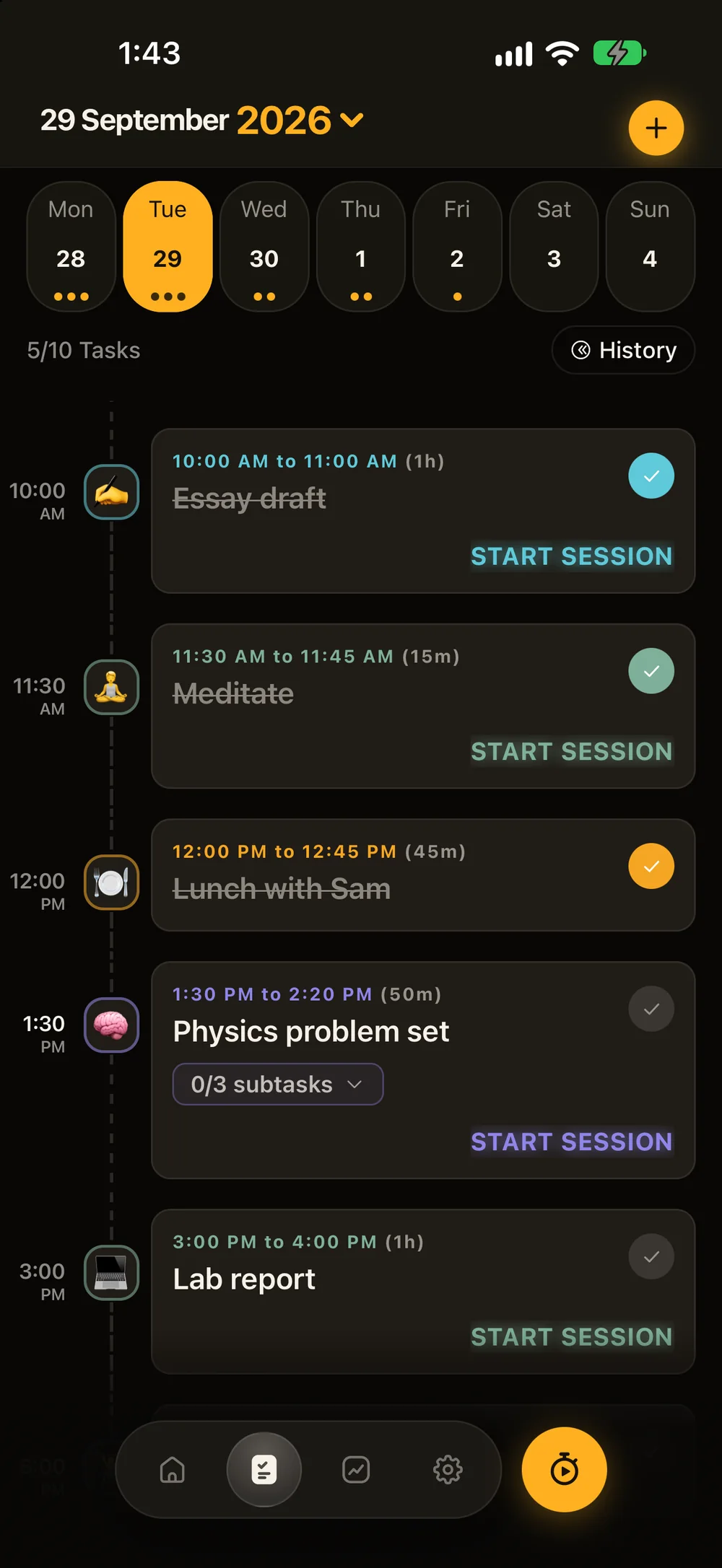
29 September 2026
Mon28
Tue29
Wed30
Thu1
Fri2
Sat3
Sun4
3/6 Tasks History
7:00AM
7:00 AM to 7:30 AM (30m)
Morning run
10:00AM
10:00 AM to 11:00 AM (1h)
Essay draft
11:30AM
11:30 AM to 11:45 AM (15m)
Meditate
1:30PM
1:30 PM to 2:20 PM (50m)
Physics problem set
0/3 subtasks ⌄Start session
3:00PM
3:00 PM to 4:00 PM (1h)
Lab report
Start session
6:30PM
6:30 PM to 7:30 PM (1h)
Reading
Start session
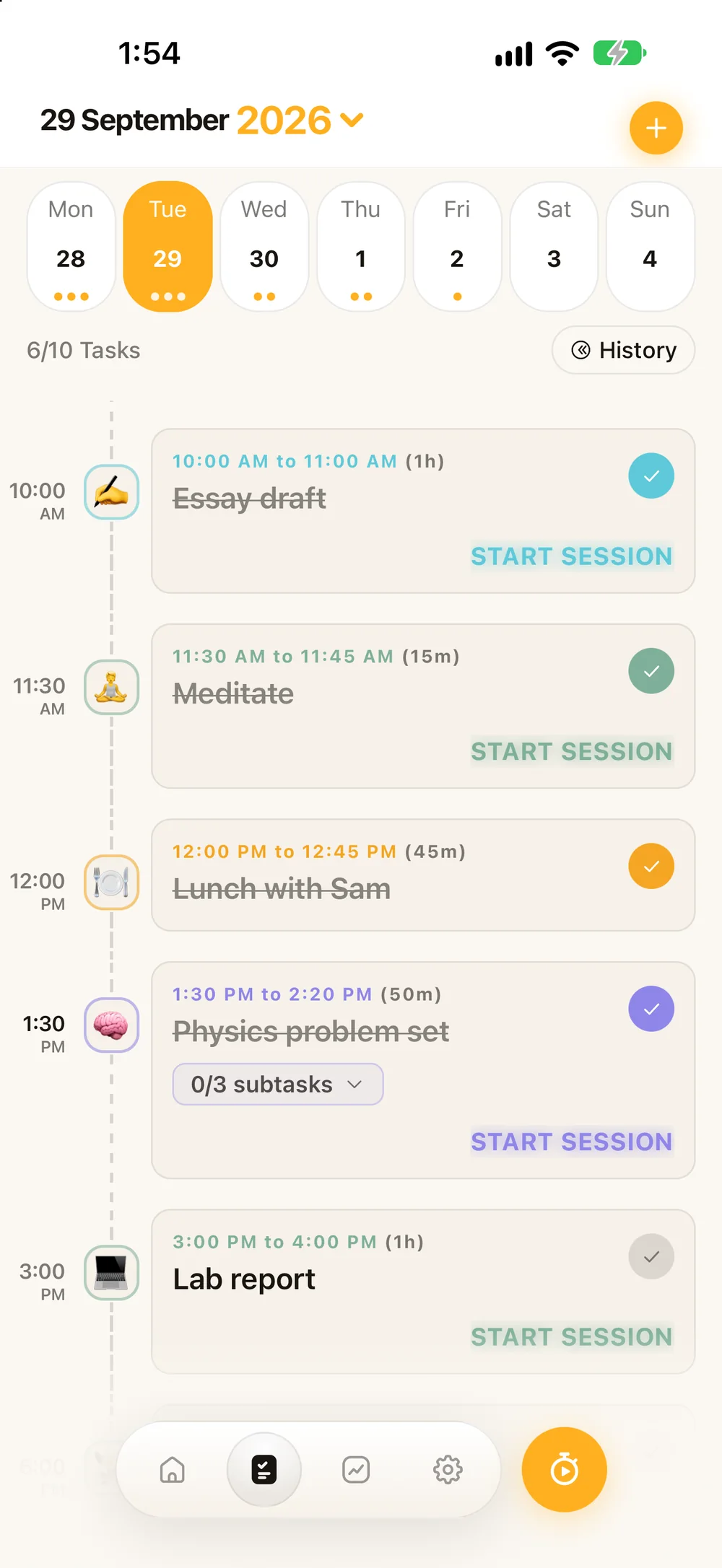
Your whole day on one timeline
Blocks sit on a rail in time order, with a week strip on top and a calendar a tap away. Finished blocks strike themselves through.
345
293031
AMPM
456
141516
AMPM
15m30m45m1hCustom
A time and a length
Spin the wheel, then pick 15, 30 or 45 minutes, an hour, or your own length.
Focus session
Start a focus session instead of a checklist item
StudyExerciseMeditateReadingDeep Work
One switch makes it a session
Turn on Focus session, pick an activity, and the block gets its own Start button.
Email tutor about labAnytime
Pick up the textbook5:30 PM
Or keep it a simple to-do
Leave the switch off for plain checklist items — with a time, or anytime today.
Read chapter 4
Problems 1–6
Check the answers
Study group in room 204 — bring the formula sheet
Subtasks and notes
Break a block into steps, and keep links, notes or phone numbers with it.
At start
15 min before
At the end
NeverDailyWeeklyMonthly
MTWTFSS
Alerts and repeats
Get a nudge at the start, before or at the end. Repeat daily, weekly on chosen days, or monthly.
EmojiIcons
Colours and icons
Presets or any colour you like, with an emoji or an icon for every block.
02 · Focus
Countdown, timer or Pomodoro.
Pick how you like to work. FlipTick runs the clock, tells you when you’ll finish, and logs every minute.
Pick a length and FlipTick tells you exactly when you’ll be done.
Length
45min
Start now and it ends at —
9:41
CountdownStudy
44445599
Ends at —
Started —45:00 target
Pause
Stay in the zone
Controls that step aside
After a few seconds only the time is left on screen.
Keep the screen awake
Auto-Lock stays off until you finish.
Dim after 30 seconds
Saves battery on a propped-up phone.
Brightness by drag
Dim or brighten the clock without leaving it.
Turn it sideways
Rotate the face for a desk-sized landscape clock.
Quiet while you focus
Silence session alerts until you’re done.
Haptics on start & finish
A soft tap when a session begins and ends.
Goals that nudge
On an open timer, get a gentle nudge at your goal.
Make it yours
Fourteen faces. Eight backgrounds.
Fire, Neon and Liquid Glass are new. Choose how your time looks, set the scene with a background, pick a sound to focus to, and tune the digits and accent until it feels like yours.
Countdown · Study
44995599
Ends at —
Clock face
BackgroundPlain
Flip colourCharcoal
Numbers
AccentAmber
SoundTap to listen
Pick a face for each session, or set your favourite as the default in Settings. Fire, Neon, Liquid Glass and the backgrounds come with FlipTick Pro.
03 · Track
Your day, at a glance.
Home shows today’s focus against your goal and how it compares with a usual day. Finished tasks build a streak you won’t want to break.
FlipTick nowTime to focusA short session now keeps your daily goal on track.
04 · Review
See where your hours went.
Every session lands in your reports — by day, week, month and year, split by activity, with the hours you focus best.
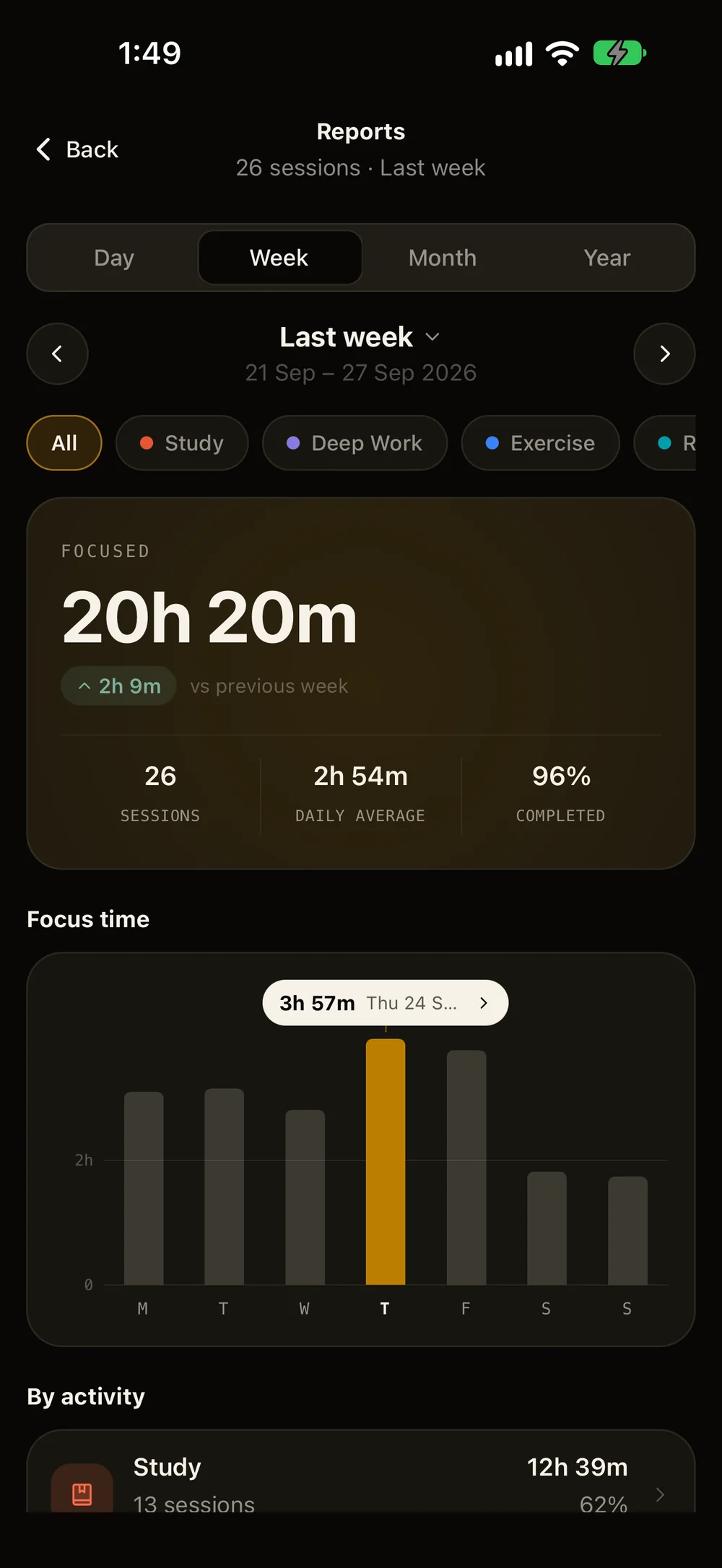
Last week
21 Sep – 27 Sep 2026
AllStudyDeep WorkExerciseReadingMeditate
Focused
20h 20m
↑ 2h 9mvs previous week
26
Sessions
2h 54m
Daily average
96%
Completed
3h 57m · Thu 24 Sep
MTWTFSS
By activity
Last week
Study12h 39m
13 sessions62%
Exercise3h 30m
4 sessions17%
Reading1h 50m
4 sessions9%
Deep Work1h 41m
2 sessions8%
Meditate40m
3 sessions3%
When you actually focus
Most focused around 9 AM
12 AM6 AM12 PM6 PM11 PM
Study · 13 sessions
Activity details
Tap any activity for its average and longest session, the time of day it goes best, and how often you finish what you start.
58m
Avg session
1h 34m
Longest session
9 AM
Best time
92%
Completed
Change vs the previous period
Progress toward your daily goal
A timeline of each day’s sessions
Day-by-day and month-by-month lists
Filter by activity
Jump to any day, week, month or year
Desk clock
A clock worth looking at.
Prop your phone up and FlipTick becomes a flip clock for your desk — with seconds, the date and fifteen world cities. Start a session from it whenever you’re ready.
110000880000AM
Device time·Follows your phone
Beyond the app
Your session, wherever you look.
Leave FlipTick and your time comes with you — in the Dynamic Island, on the Lock Screen, floating over other apps and on your Home Screen.
iPhone · iOS 16.2+
Live Activities
A running session lives in the Dynamic Island and on your Lock Screen — glanceable without unlocking, and one tap takes you straight back.
Study24:58
Tuesday 29 September
9:41
Study
Ends 10:06 PM
24:58
Android
A clock that floats
Float a clock window over other apps and your Home Screen. Drag it anywhere — while a session runs, it shows your timer.
9:41
Tue 29 Sep
ClassicBoldLEDFlip
iPhone
Ten Home Screen widgets
Flip Clock, Watchface, Field, Month Calendar, Week Grid, Split Calendar, Abstract Art and three World Clocks.
A heads-up before your usual focus time, a daily nudge when you choose, and alerts for finished sessions, Pomodoro rounds, breaks and tasks.
FlipTick8:55 AMYour usual focus time is coming upGet set — a session around now fits your routine.
FlipTick9:25 AMRound 1 of 4 completeTime for a 5-minute break.
FlipTick10:35 AMStudy session completeNice work — your session has finished.
Personal from minute one
Built around how you focus.
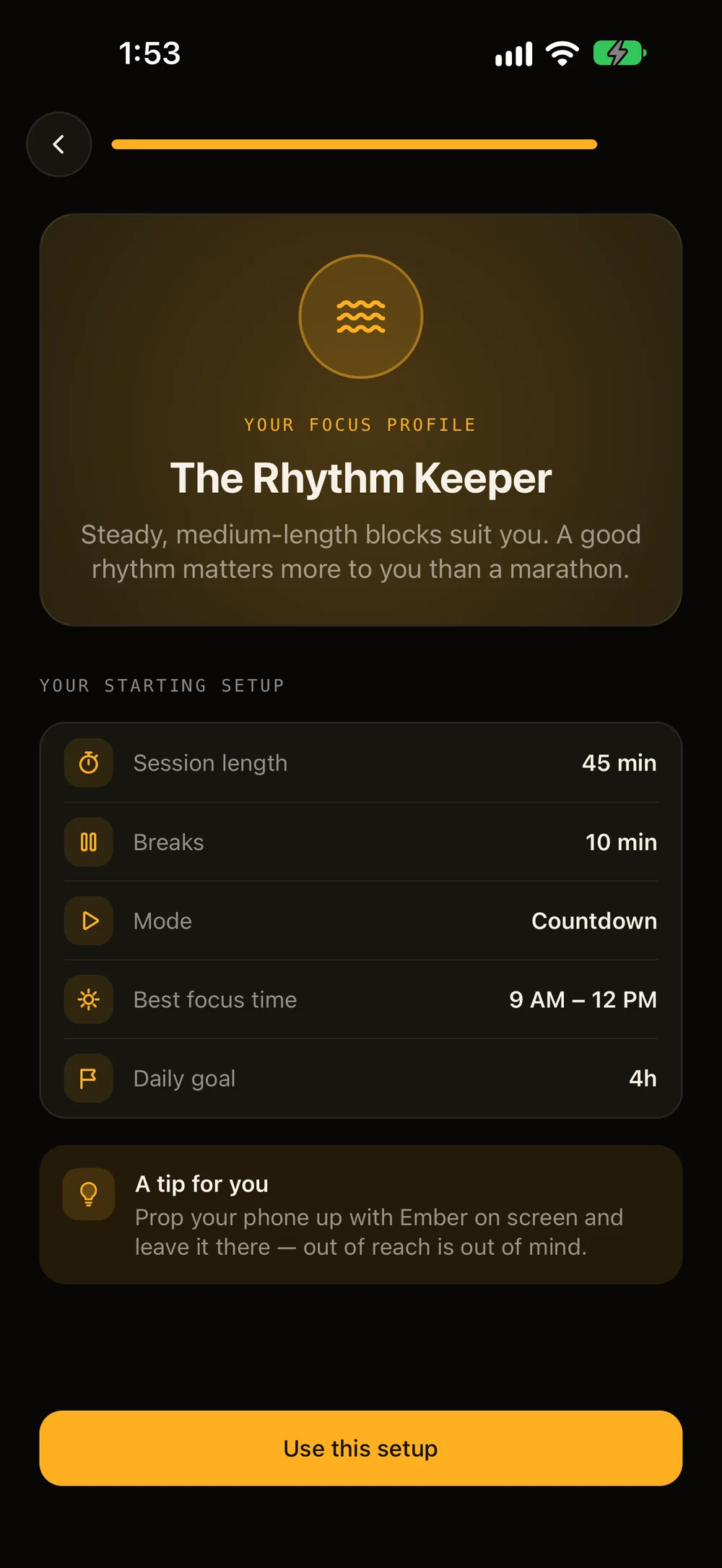
Answer seven quick questions and FlipTick sets up your session length, breaks, mode and daily goal — plus a tip for whatever pulls you away. Skip it if you’d rather dive in.
01What do you want to focus on?
02When is your mind sharpest?
03How long can you usually stay focused?
04What pulls you away most?
05How do you like to plan your day?
06What does your day look like?
07How much focus a day feels right?
The Sprinter
Short, sharp bursts with real breaks keep your energy high.
The Rhythm Keeper
Steady, medium-length blocks. A good rhythm matters more than a marathon.
The Deep Diver
Once you’re in, you stay in. Long, uninterrupted sessions are where you shine.
The details
Small things, done properly.
A day and a night theme, your choice of accent, an icon that follows your phone, fifteen languages — and nothing to sign up for.
Night and day
A warm night theme for the desk lamp hours and a paper-white day theme — switch with one tap from Home.
Day
Night
An icon for day and night
The Flip Eclipse icon glows amber by day and turns midnight blue when your phone switches to dark mode.
Fifteen accent colours
Amber is ours. Pick coral, sage, sky, violet or ten others and the whole app follows.
Speaks fifteen languages
Follows your phone, or pick one in Settings.
EnglishEspañolFrançaisDeutschItalianoPortuguêsРусский日本語한국어中文हिन्दीTürkçeNederlandsPolskiBahasa IndonesiaEnglishEspañolFrançaisDeutschItalianoPortuguêsРусский日本語한국어中文हिन्दीTürkçeNederlandsPolskiBahasa Indonesia
A flip built natively
Every flip is drawn by native code on iPhone and Android, so it stays smooth on older phones too. Choose from five completion sounds — bell, chime, pulse, digital and xylophone — with haptics on start and finish.
No account
Open it and start. No sign-up, no email, no password.
Your data stays put
Plans, sessions and goals are stored on your phone — not on our servers.
Works with Wi-Fi off
Every timer, plan and report works offline.
Pricing
Free to start. Pro for more.
The basics are free, with no account, supported by an occasional ad. Pro removes the ads, lifts the limits, unlocks everything — and keeps FlipTick independent.
FlipTick
Free
Everything you need to focus, every day.
4 focus sessions a day of up to 25 minutes — or one of up to an hour
The Flip, Minimal and Precision clocks, the day planner and widgets
Live Activities and the floating timer
A week of history and reports
An occasional ad after a session — never during one
Every clock face — Fire, Neon and Liquid Glass too — every background, flip colour and ambient sound
Repeating tasks and your full history and reports
Weekly, monthly or yearly, with a free trial
Start Pro from Settings in the app. Prices are shown before you buy, and you can cancel any time in your App Store or Google Play account.
Questions
Good to know.
Something else on your mind? Email us, or message us on WhatsApp or by text at +92 349 6772797.
Is FlipTick free?
Yes, to start. Every day you get 4 focus sessions of up to 25 minutes, or one of up to an hour, plus the planner, widgets and a week of history. The free version shows an occasional ad after a session, never during one. FlipTick Pro removes the ads, lifts the limits and unlocks every clock face, background, sound and report.
Do I need an account?
No. Open the app and start. There’s no sign-up, and your plans and sessions are stored on your phone (and, on iPhone and iPad, in your own iCloud if you sync).
Does it work offline?
Yes. Timers, plans, reminders and reports all work with Wi-Fi off.
Does FlipTick block other apps?
Yes, if you want it to. Pick the apps that distract you once, and they lock when a session starts and open again the moment it ends. On iPhone it uses Apple’s Screen Time, so your list stays private. One list is free; Pro adds more lists and Strict mode.
What happens if I stop a session early?
It still counts. FlipTick logs the time you focused, and a session started from a block ticks that block off.
Can I use the Pomodoro technique?
Yes. Set the focus length, break length and number of rounds, and FlipTick runs the rounds and breaks and tells you when you’ll finish.
Can I see a session without unlocking my phone?
On iPhone, a running session shows in the Dynamic Island and on the Lock Screen as a Live Activity (iOS 16.2 or later). On Android, a floating clock can sit over your other apps.
Manage or cancel your subscription any time in your App Store or Google Play account settings. Settings → Manage Subscription in FlipTick takes you there.
What data does FlipTick collect?
Your sessions, activities and goals never leave your phone. Purchases go through Apple, Google and Adapty. The privacy policy has the details.
11000088
Start your first block.
Free on the App Store and Google Play. No account, no setup — plan one block, tap Start, and watch the clock flip.